
Why Travelers Are Ditching Roaming for an eSIM Revolution
Imagine landing in a new country and instantly connecting to a local network without fumbling for a physical SIM card. An eSIM for travel is a digital profile you download onto your compatible smartphone, eliminating the need to swap cards. It works by allowing you to purchase and activate a local data plan before or during your trip, offering seamless connectivity. The key benefit is avoiding expensive roaming fees while enjoying the convenience of keeping your primary number active.
Why Your Next Trip Needs a Digital SIM Card
Your next trip needs a digital SIM card because it eliminates the hassle of physical swaps and roaming fees. With an esim for travel, you activate local data instantly upon arrival, avoiding airport kiosks and lost SIMs. You can keep your primary number active for calls and texts while using eSIM data for navigation and apps. This digital SIM card lets you pre-purchase plans for multiple countries, ensuring seamless connectivity from the first step off the plane. Forget hunting for Wi-Fi passwords; eSIM provides reliable, high-speed internet wherever you go, making your trip smoother and more productive. It’s the simplest upgrade for modern travelers.
The Inconvenience of Physical SIM Swap
Swapping physical SIM cards while traveling is a tangible hassle that derails your journey. You must locate a tiny tray, juggle your existing card, and risk losing your primary SIM altogether. The process requires a small tool or a paperclip, often missing when you need it most. Once inserted, you lose immediate access to your home number, locking you out of banking 2FA codes. This fiddly, high-stakes task turns a simple connectivity setup into a tense, minutes-long interruption that a digital SIM entirely avoids.
How Embedded SIMs Streamline Border Crossings
Embedded SIMs streamline border crossings by eliminating the frantic search for local SIMs upon arrival. Instead of fumbling with physical cards or hunting for a kiosk after a long flight, your eSIM activates automatically as your plane touches down. This pre-provisioned connectivity means you can immediately access maps, ride-hailing apps, or immigration digital forms. There is no need to queue at a store or eject your home SIM near a busy customs line. The process is seamless: you buy and install the profile before you leave, so coverage is waiting for you instantly, not after you clear security.
How does an eSIM actually ensure faster border processing? By keeping your device online from the moment the aircraft door opens, you can validate digital boarding passes, complete health declarations, or hail a taxi without pausing—turning a typical dead-zone entry into a connected, efficient transition.
Top Factors When Choosing a Remote SIM Provider Abroad
When choosing a remote SIM provider abroad for travel, prioritize coverage reliability—does the eSIM tap into strong local networks, or merely roam on patchy ones? Speed caps can cripple maps and translation apps, so check data throttle limits. Does the provider offer flexible, top-up-able data plans rather than rigid, one-time bundles? Q: How do I ensure seamless activation? A: Pick a provider that lets you install the eSIM before you fly, activating only upon arrival to avoid wasting days of your plan’s validity. Also, scrutinize whether voice and SMS are included or if you’ll be reliant on VOIP alone for calls.
Coverage Maps: Matching Networks to Destinations
Coverage maps are critical for matching an eSIM’s partner networks to your specific destinations. Analyze where you will actually travel—urban centers, rural roads, or remote mountains—and cross-reference those coordinates against the provider’s map of roaming zones. A network that blankets a capital city may drop to 2G in a nearby valley, effectively stranding your connectivity. Destination-specific network verification prevents this mismatch. Prioritize providers that display both native and roaming carrier footprints, as a single partner often lacks deep regional penetration. Always check if the coverage map aligns with your itinerary’s high-use locations, not just the country’s outline.
A coverage map’s true value lies in confirming network reach at your exact travel points—not just the destination’s borders—to ensure reliable connectivity where you need it most.
Data Packages vs. Talk-Only Plans
When selecting an eSIM for travel, prioritize data-only packages over talk-only plans unless you predict lengthy voice calls. Most communication abroad (maps, messaging, ride-hailing) relies on data, while voice can be handled via free Wi-Fi calling or apps. Talk-only plans often waste money on minutes you won’t use. Why is a data package usually superior to a talk-only plan for travelers? Because it gives you instant access to navigation and translation tools, while talk-only leaves you disconnected for core digital tasks. Choose a data-heavy package to stay efficiently online without hidden costs.
Pricing Transparency and Hidden Fees
When evaluating remote SIM providers for travel, scrutinizing pricing transparency directly impacts your budget. A provider must display the total cost per gigabyte upfront, including any activation fees or VAT, rather than hiding them in fine print. Hidden fees often emerge as daily “service charges,” top-up penalties, or expiring data balances that force repurchases. You should compare the effective rate after all additions, as a cheap headline price frequently masks surcharges for tethering or premium network access. The logical approach is to multiply the per-MB cost by your estimated usage, then verify no compulsory extras exist.
Pricing transparency means the final cost per gigabyte is clear before purchase; hidden fees are any charge not included in that displayed rate, requiring you to calculate the true total.
Step-by-Step Setup Before Departure
Before departure, ensure your device is unlocked and check eSIM compatibility in Settings > Cellular. Purchase your travel eSIM from a provider’s app or website, then receive the QR code or manual activation code via email. Install the eSIM profile while still on Wi-Fi by scanning the QR code under “Add Cellular Plan.” Label the new line clearly, such as “Europe Data.” Set the eSIM as your primary data line and your home SIM as “Secondary” for voice. Disable automatic network selection on the eSIM to avoid roaming fees.
Activate the eSIM plan immediately after installation, as some providers require it before the travel date—but do not enable data roaming until you land.
Finally, toggle off your home line’s data to prevent accidental charges. Confirm the eSIM shows a signal in airplane mode before departing.
Checking Device Compatibility for Virtual SIMs
Before departure, verify your smartphone supports eSIM for travel by checking the manufacturer’s specifications, as not all models are compatible. For iPhones, models from the XS/XR onward (excluding some Chinese variants) generally work, while most Google Pixel and Samsung Galaxy S20+ or newer devices are eSIM capable. Access your phone’s settings under “Cellular” or “Mobile Data” or dial *#06# to see if an EID number appears, confirming the necessary hardware. Carrier locking can block virtual SIM activation, so confirm your device is unlocked by your home provider.
| Compatibility Check | User Action |
|---|---|
| Device age and model | Visit official list or settings |
| Carrier lock status | Confirm unlocked via carrier app or account |
| Software version | Update to latest iOS or Android |
Installing and Activating the Profile Remotely
Remote installation of an eSIM profile is completed entirely online before departure, eliminating physical SIM swaps. Once you purchase a travel plan, a QR code or activation link is emailed or displayed in-app. Scan or tap this immediately on the device; the profile downloads and installs. For seamless eSIM activation, ensure a stable Wi-Fi connection during this step—cellular data may disconnect temporarily. After installation, manually enable the new line in device settings and assign it for data.
- Scan the QR code or click the activation link within 24 hours of purchase to avoid expiration.
- Turn off the primary physical SIM’s data roaming to prevent unwanted charges.
- Label the eSIM profile clearly (e.g., “Japan Travel”) for easy management abroad.
- Test the connection by toggling airplane mode after activation to lock in the network.
Managing Multiple Profiles for Multi-Country Trips
Before departure, organize your eSIM profiles by country or region to eliminate connectivity gaps during multi-country trips. Rename each profile clearly—such as “Japan Data” or “EU 10GB”—inside your phone settings. For automatic switching, ensure your device allows multiple active profiles; disable data roaming on unused ones to prevent accidental charges. Test that fallback logic works: if one profile’s data runs out, your phone instantly activates the next prepared plan without manual intervention.
Q: How do I prevent two active eSIM profiles from conflicting?
A: Set one as your primary data line, turn off automatic network selection, and manually select the correct carrier in each new country—your phone will then ignore competing profiles until you switch.
Cost Comparison: Roaming Charges vs. Local Virtual Networks
Standing at the airport departure gate, I mentally tallied the cost of turning on my home carrier’s data—$15 per day for just 500MB. Instead, I installed a local eSIM virtual network. For the same price as one day of roaming, I got 5GB of high-speed data valid for 30 days on the same local towers.
Roaming charges turned my phone into an expensive brick, while a local virtual network on eSIM made it a tool that cost less than a single airport coffee.
On a two-week trip, that single eSIM purchase saved me over $200 compared to roaming daily passes, all without swapping physical SIMs or hunting for Wi-Fi passwords.
Breaking Down Carrier Fees Per Gigabyte
When comparing costs for travel data, per-gigabyte carrier fees reveal the real value of an eSIM. Traditional roaming often charges $10–$20 per GB, a markup that can drain your budget after just a few map sessions or social media uploads. In contrast, local virtual networks accessed through eSIMs typically drop that rate to $1–$5 per GB, depending on the region. This sharp price difference isn’t just about saving pennies; it’s about multiplying your usable data. Breaking down these fees shows that switching to an eSIM provider can give you five to ten times more data for the same money, making it a financially smarter, more practical choice for any trip.
Regional Passes for Backpackers and Frequent Flyers
For backpackers traversing multiple countries, regional eSIM passes for travel offer seamless connectivity across borders without per-nation switching. A single Asia-Pacific or Europe-wide pass, for instance, activates upon arrival and automatically roams between partnered networks, eliminating local SIM hunting. Frequent flyers benefit from multi-region plans covering transcontinental routes, such as a combined Middle East and Africa pass. These passes typically cap per-GB costs lower than individual roaming charges, but data speeds often throttle after a fair-use threshold. The table below details key trade-offs:
| Aspect | Backpacker Preference | Frequent Flyer Preference |
|---|---|---|
| Coverage Scope | Entire continent (e.g., Europe 33 countries) | Multiple disconnected regions (e.g., Asia + Americas) |
| Validity | 7–30 days, fixed | Flexible start, 15–90 days |
| Data Priority | Medium speed, large volume | High speed, moderate volume |
Navigating Data Speeds and Throttling Policies
When traveling with an eSIM, navigating data speeds and throttling policies is critical to avoid frustrating slowdowns. Many budget-friendly plans advertise “unlimited data” but cap your speed to 256 kbps or less after a few gigabytes—barely enough for maps or messaging. Always check a plan’s “fair usage policy” before activation; some providers restore full speeds once you manually purchase a top-up.
Pro tip: Keep a second, speed-priority prepaid eSIM profile downloaded for video calls or emergencies, switching between them as needed to dodge throttle-induced buffering.
Monitor your real-time usage in the eSIM app to anticipate slowdowns, and disable automatic updates to conserve your high-speed allowance during peak travel hours.
4G vs. 5G Availability in Different Regions
When traveling, your eSIM’s data speed hinges on 4G vs. 5G availability in different regions. In Japan and South Korea, 5G blankets major cities like Tokyo and Seoul, letting you stream instantly; but rural Hokkaido relies on robust 4G. Europe offers patchy 5G—central Paris is blazing, yet remote Spanish villages stay on 4G-only. The US has fast 5G in downtown Manhattan, but driving through Arizona drops you to steady 4G. Your eSIM automatically switches, so check a coverage map before your trip to avoid surprises.
4G is your reliable global backbone, while 5G is a regional bonus—always verify local coverage before relying on it.
What Happens When You Exceed Your Data Limit
When you exceed your eSIM data limit while traveling, your connection typically slows to 2G or 128 kbps speeds, making maps nearly unusable and social feeds take minutes to load. Most providers instantly cut your high-speed data, but critical travel apps like WhatsApp or email may still function at a crawl. Some eSIMs automatically offer a top-up purchase, while others simply stop data entirely until you buy a new plan—leaving you offline at a critical moment. Surprisingly, a few carriers allow unlimited throttled data, so you never face a hard cut, just extreme slowness.
Exceeding your data limit on a travel eSIM forces near-dial-up speeds, halts navigation, and may require an instant top-up to restore functionality.
Best Practices for Keeping Connected Across Borders
For seamless cross-border travel, always install your eSIM before departure to avoid patchy airport Wi-Fi. Test connectivity by toggling airplane mode after activation; this forces the network refresh. A frequent question: Q: Should I keep my physical SIM installed? A: Yes, but disable it in settings to prevent accidental roaming charges while using your eSIM’s data. Pre-purchase region-specific plans (e.g., “Asia-Pacific” vs. single-country) to ensure consistent speeds, and carry a printed backup of your eSIM’s QR code in case you need to reinstall. Finally, manually set your device’s APN to the eSIM provider’s specs—this eliminates connection hiccups at borders.

Switching Between eSIMs Without Losing Service
Switching between eSIMs without losing service is simpler than you think. First, ensure all your eSIM travel profiles are saved and clearly labeled in your phone’s settings. Before deactivating a local profile to switch to another, turn on Wi-Fi calling on your primary number so you don’t miss key calls during the change. Then follow this order:
- In cellular settings, disable the current data line.
- Immediately enable the new eSIM profile you need for that region.
- Toggle airplane mode on and off to refresh the network connection.
This keeps your active service gap-free and your secondary line reachable.
Using Wi-Fi Calling to Reduce Data Usage
When traveling with an eSIM, activating Wi-Fi Calling ensures your calls and texts are routed through a stable Wi-Fi network rather than consuming your cellular data allowance. This is especially critical when your eSIM plan offers limited high-speed data but includes unlimited talk minutes. Even when cellular signal is weak, Wi-Fi Calling can seamlessly shift traffic to any available Wi-Fi network, preserving your mobile data for essential tasks like maps or messaging. Enable this feature before departure, as some carriers require initial activation on your home network. Activating Wi-Fi Calling in your phone’s settings is a direct method to prevent voice usage from draining your eSIM’s data quota.
- Check that your eSIM carrier supports Wi-Fi Calling on your device model.
- Manually connect to trusted Wi-Fi hotspots (hotel, café) before making or receiving calls.
- Keep Airplane Mode off unless you specifically want to force Wi-Fi-only operation.
- Test call quality after switching Wi-Fi networks to avoid dropped connections.
Emergency Backup Options When Signals Fail
When primary eSIM signals fail due to network outages or dead zones, pre-installed offline emergency eSIM profiles become your lifeline. These profiles store essential data for instant activation without real-time internet. Complement this with a physical backup SIM from a different carrier in your second slot, ensuring geographical redundancy. For critical connectivity, carry a portable satellite messenger or a dual-network hotspot device. Always download offline maps and emergency contact lists before departure, as they function independently of cellular signals.
Emergency backup options require proactive preparation: offline eSIM profiles, physical SIM redundancy, and satellite devices ensure connectivity when primary signals collapse.
Security and Privacy Considerations for Travelers
Using an eSIM for travel actually boosts your privacy by eliminating the need to swap physical SIMs in public, which can expose your home number. However, only purchase eSIMs from reputable providers to avoid malicious profiles that could intercept your data. A common question is: Should I use a VPN alongside my travel eSIM? Absolutely yes, because while the eSIM encrypts your connection to the carrier, a VPN adds a second layer for all your app traffic, especially on public Wi-Fi. Always disable automatic network selection to prevent your phone from connecting to a fake cell tower that could track your location or steal login credentials.
Encryption Standards in Digital SIM Profiles
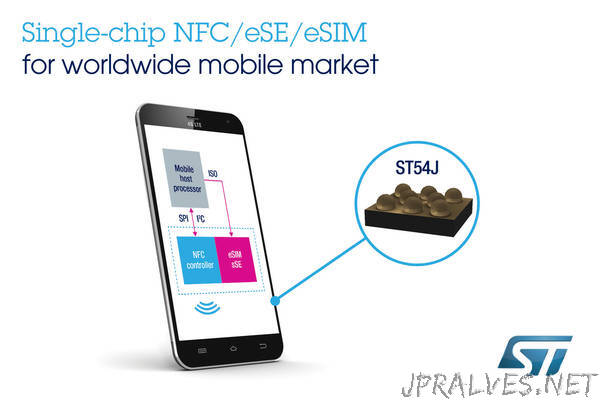
When you download an eSIM for travel, strong encryption standards in digital SIM profiles protect your carrier credentials from being intercepted or cloned. These profiles use AES-256 encryption to secure your IMSI and authentication keys, stored directly in your device’s secure element. This means even if someone sniffs your phone’s data request, they can’t extract your SIM identity or use it maliciously. Digital signatures within the profile also verify that the SIM data came from a trusted source, preventing fake profiles from hijacking your connection abroad.
Encryption standards in digital SIM profiles use AES-256 and digital signatures to keep your travel eSIM credentials safe from theft and cloning.
Risks of Public Networks and How eSIMs Mitigate Them
Public Wi-Fi and hotel networks expose travelers to man-in-the-middle attacks, credential harvesting, and unencrypted data interception. An eSIM mitigates these risks by establishing a direct, encrypted cellular connection to a carrier’s network, bypassing shared hotspots entirely. This ensures all traffic— including login credentials and financial transactions—remains insulated from rogue access points. Malicious hotspot avoidance is automatic with eSIM, as your device never searches for open, unsecured Wi-Fi. Travelers using eSIM circumvent the need to connect to unknown routers, reducing exposure to packet sniffing and session hijacking on public infrastructure.
Q: Can an eSIM protect me if I still connect to public Wi-Fi for data?
No—the eSIM only secures its own cellular data path; if you manually join open Wi-Fi for large downloads, that connection remains vulnerable to local network attacks.
Future Trends Shaping Mobile Connectivity on the Road
Future trends will see eSIMs enabling seamless, adaptive roaming profiles that auto-negotiate the strongest local network in real-time, eliminating the need for manual profile selection. Multi-network bonding, where a single eSIM can aggregate bandwidth from multiple local carriers, will deliver consistent, high-speed connectivity even in remote areas. A key development is network slicing, allowing travelers to prioritize data throughput for specific applications like navigation or video calls. Q: How will connectivity improve for road travel? A: By combining dynamic network switching with aggregated bandwidth, ensuring stable, high-performance links across diverse geographical regions. Embedded eSIMs will also facilitate temporary local numbers for ride-hailing and food delivery, integrated directly into travel management apps for one-tap activation.
Integration with IoT Devices and Smart Luggage
An eSIM transforms travel by enabling seamless integration with IoT devices and smart luggage. A traveler can monitor their checked bag’s real-time location via a built-in GPS tracker, using the same eSIM data plan as their phone. Similarly, a smart suitcase’s digital lock or weight sensor can push alerts directly to the eSIM-connected device without needing separate SIMs or local Wi-Fi. This unified connectivity ensures the luggage remains China eSIM trackable and manageable across borders, all through the single eSIM profile already active on the traveler’s handset.
eSIMs streamline travel by allowing smart luggage and IoT sensors to share one data profile for real-time tracking and alerts.
Blockchain-Based SIM Cards and Decentralized Plans
Blockchain-based SIM cards transform travel connectivity by removing the need for centralized carrier negotiations. Instead, you purchase data directly from a global pool of providers via a decentralized ledger, ensuring you always access the cheapest local rates without roaming markups. To activate, you simply:
- Purchase a blockchain token or NFT representing your data plan.
- Scan a QR code on the eSIM-compatible device to link your digital wallet.
- Top up peer-to-peer using cryptocurrency, with transactions confirmed in minutes without middlemen.
This model gives you instantaneous carrier switching at each border, making connectivity as fluid as currency exchange.
